Skip to content
  • Categories
  • Recent
  • Tags
  • Popular
  • Users
  • Groups
Skins
  • Light
  • Cerulean
  • Cosmo
  • Flatly
  • Journal
  • Litera
  • Lumen
  • Lux
  • Materia
  • Minty
  • Morph
  • Pulse
  • Sandstone
  • Simplex
  • Sketchy
  • Spacelab
  • United
  • Yeti
  • Zephyr
  • Dark
  • Cyborg
  • Darkly
  • Quartz
  • Slate
  • Solar
  • Superhero
  • Vapor

  • Default (Darkly)
  • No Skin
Collapse
Electric Airhip Forums

Electric Airship Forums

sawyerfriendS

sawyerfriend

@sawyerfriend
About
Posts
14
Topics
6
Shares
0
Groups
0
Followers
3
Following
5

Posts

Recent Best Controversial

  • Archipelago
    sawyerfriendS sawyerfriend

    @DecentTreatment said in Archipelago:

    That list should be bigger tbh. I feel like people just don't know about it or how to use it! Was it relatively simple to set up?

    Tragically, it was not simple to set up. Potentially the hardest thing I've ever done in RPG Maker, although to be fair a good chunk of that is due to it being RND, as you can see not many people have attempted it so I had to learn on my own.
    The original plan was my dedicated programmer would figure it out, but he was completely baffled by it! Not his fault, he's a much better programmer than me but simply doesn't know Archipelago very well. However, I'm glad he gave up on it, since it forced me to hunker down and figure it out myself. It took about two months of dedicated work.

    But the good news is that now that I know how it works, the process is much, much easier for future games, and I was able to get a working jam game made in about three days. It remains a lot of effort; no matter how good you are, there's no avoiding needing to register and index every single instance of an item pickup in your game, as well as the surrounding game logic (e.g. you need Surf to enter Cinnabar Island), but that's mostly tedious work as opposed to intellectually difficult, after you figure out how to get it compatible. Now that I've crossed the line, I hope more devs can benefit from all that work!

    General Discussion

  • Archipelago
    sawyerfriendS sawyerfriend

    Here's a list of every Archipelago compatible game that I recognize as an RPG Maker game, I may have missed some!

    -I Hate You, Please Suffer
    -Silver Daze (Hey that's me!)
    -Laixa: Check The Back (Hey, that's also me!)
    

    ...wait, is that it? That's genuinely all I could find, I seriously thought there were more!
    Well, with non-RM games we have a few more options you guys might be interested in:

    -Crosscode
    -Crystal Project
    -Deltarune (Up to Ch4)
    -Cassette Beasts
    -Chained Echoes
    -Library of Ruina
    

    So I guess what I've learned here is we need to get more RPG's compatible!
    Here's a full list of all known Archipelago compatible games.

    As you can see, since Silver Daze is compatible, I do know how to set it up for RPG Maker MV and MZ. If anyone is interested in my assistance, please feel free to hit me up! With the assistance of the Discord user YellowIris, we converted the proprietary Silver Daze Archipelago plugin into a more universally usable one, which you can find here. Of course, it's a lot of work, but I just love Archipelago too much not to strive to see more games compatible. I'm hoping someday I'll have the time to make Axial work as well!

    General Discussion

  • Archipelago
    sawyerfriendS sawyerfriend

    Are you guys familiar with Archipelago?
    It's one of my favourite ways to replay games lately! A decent chunk of indie RPGs are some level of compatible with it as well, including some of my own.

    If there's interest, I could probably compile a list of every RPG Maker game that currently has Archipelago support.

    General Discussion

  • Optimizing the Fun Into A Game - Kingdom Hearts 2's Brilliant Ecosystem
    sawyerfriendS sawyerfriend

    Watch Here!
    b1323dff-0dc3-4b69-aa15-cff311334895-image.png

    A few months ago I participated in a program called The Artist's Way, which is a 12 week program meant to improve your mentality around art. During the first week I was asked to live out an "alternate dimension" version of myself, so I decided to play out a universe where I became a Youtube Video Essayist instead of a game designer. This is the result!

    I have a lot of passion for game design and ecosystems and I feel I appreciate these things in a way others often overlook, so I'm really proud of this! I didn't want to get hung up about numbers and views and all of that, so I published it on my alt account where I've done very little substantial work, and it ended up getting a modest following.

    If you have any interest in Kingdom Hearts or video game ecosystems, I think you'll really enjoy this!

    Share Youtube Videos!

  • Region Offset - Change Encounter Tables On The Fly
    sawyerfriendS sawyerfriend

    Hello everyone! I'm trying to do one post a day until I make a habit of it, so part of that will be posting some utilities that I've made in the past. This is a favourite of mine!

    Region Offset

    Have you ever wanted to make random encounter tables update mid-game? For example, after a critical story moment, areas may get swarmed with more powerful enemies, or a location might temporarily get overrun with an enemy faction. In the past, I've made duplicate maps to accomplish this effect, but I later created a plugin to achieve this. That plugin is now yours!

    How To Use It

    The plugin contains a Region Offset Variable parameter. Select the variable you want to use to define this, and the game will add this number to the current regions on the map. Here's an example:
    cefb7593-e0ee-432a-aa55-ee850e9d04e6-image.png
    On this map, I have three regions: 1, 2, and 3. But if you look at my encounter table, you'll find that I also refer to regions 51, 52, 53, and 101, 102, and 103.
    cc69e7fd-a393-4a43-b8ac-603bbdab4227-image.png

    Once the plugin is installed, at any point in the game I can simply change the offset variable to 50, and I'll gain access to the random encounters in that range, or 100 to gain access to those other encounters. If I want to go back to the original encounters, I can simply return the variable to 0.

    Important!

    This plugin does NOT modify regions, only the encounter tables within those regions. Any other scripts or events that refer to regions will refer to their default region, i.e. the region shown on the map in the editor.

    License

    This plugin is published under the MIT License!

    Copyright © 2026 <copyright holders>
    
    Permission is hereby granted, free of charge, to any person obtaining a copy of this software and associated documentation files (the “Software”), to deal in the Software without restriction, including without limitation the rights to use, copy, modify, merge, publish, distribute, sublicense, and/or sell copies of the Software, and to permit persons to whom the Software is furnished to do so, subject to the following conditions:
    
    The above copyright notice and this permission notice shall be included in all copies or substantial portions of the Software.
    
    THE SOFTWARE IS PROVIDED “AS IS”, WITHOUT WARRANTY OF ANY KIND, EXPRESS OR IMPLIED, INCLUDING BUT NOT LIMITED TO THE WARRANTIES OF MERCHANTABILITY, FITNESS FOR A PARTICULAR PURPOSE AND NONINFRINGEMENT. IN NO EVENT SHALL THE AUTHORS OR COPYRIGHT HOLDERS BE LIABLE FOR ANY CLAIM, DAMAGES OR OTHER LIABILITY, WHETHER IN AN ACTION OF CONTRACT, TORT OR OTHERWISE, ARISING FROM, OUT OF OR IN CONNECTION WITH THE SOFTWARE OR THE USE OR OTHER DEALINGS IN THE SOFTWARE.
    

    If you would like to credit me, a special thanks under Sawyer Friend would be appreciated! If you use a lot of my plugins, a programming credit works too!

    PLUGIN

    Here's the plugin, simply copy and paste this code!

    //=============================================================================
     /*:
     * @plugindesc v1.0.0
     * Use this to offset region enemies using a variable.
     * @author Sawyer Friend
     * @help
     * This lets you add a flat number to region encounters based on a variable, so you can change what enemies appear at given times.
     *
     * Simply define in the plugin params which variable that you want to add onto the regions, then change that variable as desired.
     *
     * (Example: Variable 6 is the variable that changes regions. If you set it to 1, every Region 1 will now pull enemy data from
     * Region 2, etc.)
     * 
     * NOTE: This plugin only affects the enemy data. The regions will still be recognized as their normal region number for any other
     * purposes (this is to ensure compatibility with other plugins and features)
     * 
     * @param Region Offset Variable
     * @desc This is variable that will offset the regions.
     * 0 will not offset any region.
     * @default 0
     *
     */
    //=============================================================================
    
    var Sawyer = Sawyer || {} // IMPORTANT
    Sawyer.Parameters = PluginManager.parameters('SawyerRegionOffset');
    Sawyer.Parameters = Sawyer.Parameters || {};
    Sawyer.RegionOffset = Sawyer.RegionOffset || {};
    Sawyer.RegionOffset.variable = Sawyer.Parameters['Region Offset Variable'];
    
    
    Game_Player.prototype.meetsEncounterConditions = function(encounter) {
    	var region = Math.floor(this.regionId() + $gameVariables.value(Sawyer.RegionOffset.variable));
        return (encounter.regionSet.length === 0 ||
                encounter.regionSet.contains(region));
    };
    

    Most of my plugins are proprietary and made for use specifically within my games' systems, but I'd be willing to clean some of them up to make them public here as well. I hope this helps you guys!

    MV Plugins

  • MAC_High_Hz_Fixes - Fixes for various problems with >60Hz monitors
    sawyerfriendS sawyerfriend

    Oh yes, this is a classic issue! I've seen a lot of fixes around but it's a shame none of them ever hit the mainstream, feels like the only way to know about this stuff is to know someone who knows.

    I like this version of the plugin, especially since it fixes some other framerate stuff and it's under an MIT license! I might just swap it in and see how I like it, thanks a lot!

    MV Plugins

  • Happy to see a forum again
    sawyerfriendS sawyerfriend

    @LumiTDog said in Happy to see a forum again:

    @sawyerfriend One of the hardest parts about integrating into a forum (or any social platform really) is finding the threads where I actually feel like I have something to say, and I'm not just forcing myself to speak artificially. I think a smaller size will definitely help with that.

    Oh yeah, I'm 100% the same way. I'm also thinking it'll help if I contribute a bit as well, honestly the old forums were so big and fast that I assumed anything I had to say had probably already been said before, but here I know whatever posts I make will be fresh, so I'm going to try to share some of the tips I've accumulated over the years.

    General Discussion

  • Happy to see a forum again
    sawyerfriendS sawyerfriend

    @LumiTDog said in Happy to see a forum again:

    I've never been particularly active on forums (bar one example) but that is a change I'm trying to make. Hopefully this can be one of the places I integrate into my efforts

    Honestly I think the fact that we're here at the start when there are only like 20 guys will help a bit, since activity will be slow to begin with rather than a constant barrage of activity. I think as time as the forum grows we'll be able to slowly adapt and keep up with the new posts as they come in!

    General Discussion

  • Vagrant Shifter - A strage Psychological Horror RPG
    sawyerfriendS sawyerfriend

    It's a pleasure seeing you here, Lumi! I can vouch for Vagrant Shifter, it's a very cool game and I eagerly await its full release!

    Show Your Games

  • Sawyer's Guide To Speedy Game Updates
    sawyerfriendS sawyerfriend

    Heya everyone! If you've published a game before, you probably know that you need to update a game from time to time to improve content or fix errors! This can be a pretty long process if you go about it through normal channels.

    In this guide I’mma teach you how to use Shell Commands to turn the process of updating your games to Steam and Itch from a 30 minute ordeal to a single double click! You can spend a little time up front to save you hours in the future!

    Steam

    Let’s start with Steam. This is gonna assume you have already gotten your game set up on Steamworks and the build is already playable on your account.

    First, you’re going to need to get a copy of Steamworks SDK.

    Place the download somewhere safe and unzip it. I personally place it in the Documents folder. Its location is important, as we will be referencing it later.

    While you’re at it, pick up a copy of Butler for Itch.io. We can use Shells to combine the commands from all of our little friends together into a single smooth process.

    First off, let’s go ahead and get SteamworksSDK taken care of.
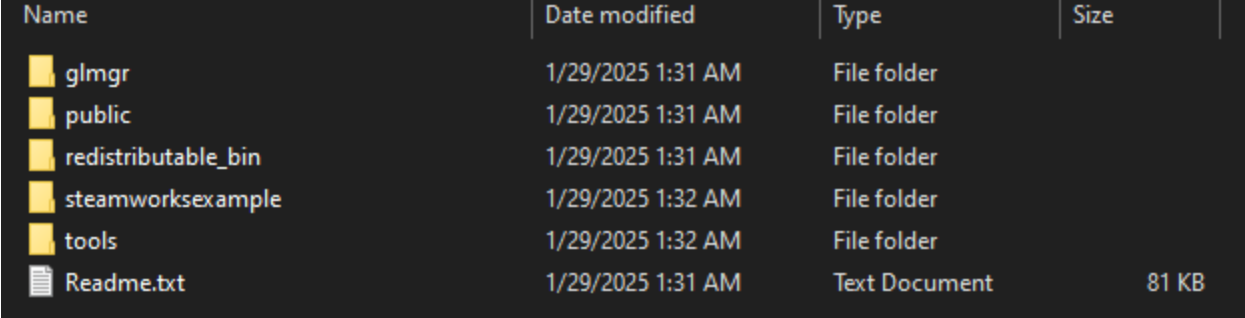
    Sprite-0002.png
    Inside the SDK is a bunch of nonsense. We’re gonna open up the Tools folder.

    Follow the folders through ContentBuilder>scripts, and you’ll find a few .vdf files in here. These are scripts you can open in a text editor to create some arguments to upload with.
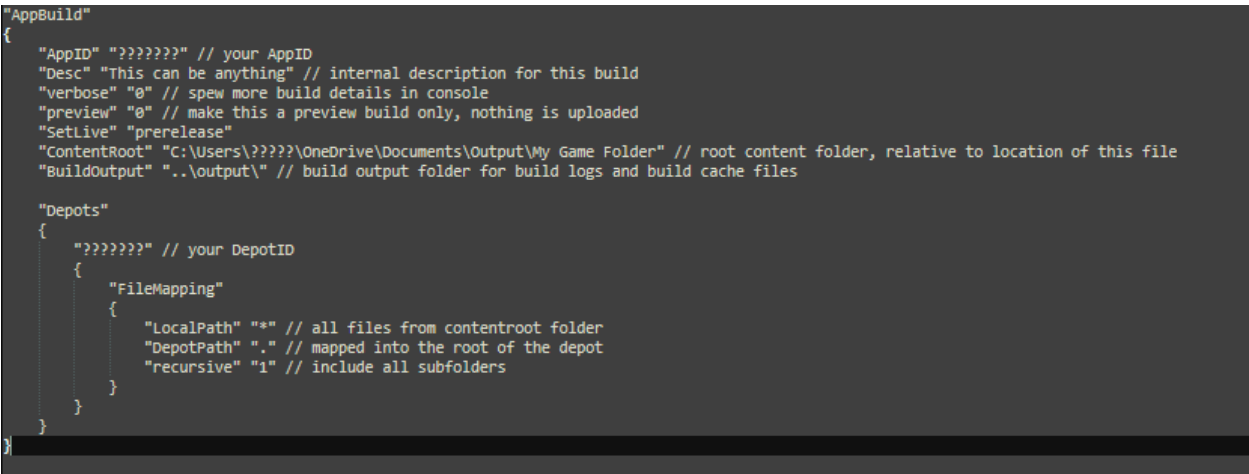
    Sprite-0003.png

    Opening up one of these in a text editor, you’ll see a good number of parameters. I censored out my own sensitive info just to be safe, but the question marks would be replaced by your AppId and DepotId (You can find those both in the Steamworks website).

    Below is a template for a script that will upload to a depot and instantly update it:

    "AppBuild"
    {
    	"AppID" "???????" // your AppID
    	"Desc" "This can be anything" // internal description for this build
    	"verbose" "0" // spew more build details in console
    	"preview" "0" // make this a preview build only, nothing is uploaded
    	"SetLive" "???????" // Which build path to set live to
    	"ContentRoot" ?????????" // root content folder, relative to location of this file
    	"BuildOutput" "..\output\" // build output folder for build logs and build cache files
    
    	"Depots"
    	{
    		"???????" // your DepotID
    		{
    			"FileMapping"
    			{
    				"LocalPath" "*" // all files from contentroot folder
    				"DepotPath" "." // mapped into the root of the depot
    				"recursive" "1" // include all subfolders
    			}
    		}
    	}
    }


    With the above, replace the question marks with the parameters that the comments ask for, such as the root folder location you want to pull from and your AppIds. Everything else should stay the same. You can also read the documentation to better understand what you’re setting up.
    Using this, you can pull from your deployed project folder without needing to zip it: Steam will upload it all straight from the source.

    Once you’ve prepared the script to your needs, save it with a unique name. Remember this file path (in fact, copy and paste the file path into a notepad so you don’t forget it), we will be needing it later.

    Now, let’s try running a script! Below is a sample line that you can plug into your command prompt of choice that will instantly run the script we just made. This time, replace anything in [] with the relevant info, removing the brackets.

    [filepath for your steamcmd.exe] +login [your username] “[your password]” +run_app_build ../scripts/[the name of your script] +quit
    

    If done correctly, once you hit enter, the above should instantly upload your game to Steam and set it live for the build you defined. Now, let’s put this somewhere easy to execute so we don’t have to open Command Prompt.

    Open your text editor of choice (I like Notepad++) and paste this command into it. You can use a # to write comments as well, e.g.

    Sprite-0004.png

    IMPORTANT: If you copy and paste from the file path in File Explorer on Windows 10, it’ll write the slashes using a backlash. If you want this to run as a shell command, you must replace those with a forward slash (/).

    Now, save this as a .sh file somewhere easy for you to access. You can even save it to your desktop!
    Now, once it’s saved, try double clicking that .sh file, and it should open up Steam and upload your game a second time!

    Congratulations! You can now make multiple scripts and call them as desired to update your Steam builds in whatever configuration you need.

    Itch.io

    Okay, next up is Butler, for Itch.io. Inside is a Butler.exe, go ahead and run it.
    This will automatically set up Butler and it should now be able to run commands for you.

    Here is an example of a command that will instantly upload a build onto Itch.io. Unfortunately, this will be made public instantly, unless the game is private, since Itch doesn’t support private depots.

    butler push "C:\Users\????\Documents\Output\Silver Daze" sawyer-friend/silverdazetest:win-fullgame
    

    In the above command, you simply have to write “butler push” followed by the folder path that you’re pushing, the url of the Itch page you are pushing to, and finally that colon is the “channel”, the thing that people can download. For example, this channel is called “win-fullgame”, so the uploaded zip will be titled “fullgame” and labelled as a windows game.
    You can read the full documentation on Butler here.

    The first time you upload to Itch using Butler, it’ll have you login to Itch with your username and password. The first upload takes a much longer time as it’s uploading the entire thing, but it will become much faster after this use because Butler automatically skips unchanged files, only updating changes to your game rather than the entire game each time.

    In our shell file, if we want to push to Itch and Steam at the same time, just copy the Butler command you made and paste it above or below Steam (doesn’t matter which, this only changes what order they get uploaded in)

    Sprite-0005.png

    Here’s an example of how that would look.

    If you want to do any of these features independently, simply place them in their own separate shell scripts.

    Demo Merge

    Next up, I’ll show you how to merge your Demo from the full game, updating it instantly while excluding any files that aren’t in there.
    WARNING: If you don’t have any infrastructure in place to differentiate the demo from the full game, the demo is just going to treat itself as the full game but missing files, so it’s gonna crash. You’ll need to either manually edit the demo after the push to ensure it’s safe, or strategically consider which files to exclude to retain compatibility.

    We will use a feature called Robocopy, which is automatically included in your copy of windows. Here is the documentation on Robocopy if you need to edit anything.

    The following is an example of a Robocopy command that will merge Silver Daze into the Silver Daze Demo:

    robocopy "C:\Users\???\Documents\Games\Silver Daze" "C:\Users\???\Documents\Games\Silver Daze Demo" /s /xl
    

    As you can see, this one is really easy. The first part is the folder you are copying from, and the second is the folder you are copying to. “/s” means that you are copying subfolders (this means every folder in this path gets copied in), and “/xl” means “exclude lonely”, and will not copy any files that don’t exist in the target location, e.g. any files not present in your demo.

    Now, this will run fine in Command Prompt, but to make it Shell compatible we have to add one last thing, which is to convert all of our options (such as /s) to have two slashes instead (e.g. //s). That’s just a quirk of shell files.

    So, the above script will copy EVERYTHING that exists in the demo, but of course you may want to exclude a path or specific file. For that, we can use “/xf [filename]” to leave out a file, or
    “/xd [foldername]” to leave out a folder, ignoring the brackets.

    Instant Deploy

    Lastly, we can use Robocopy to deploy the game faster, without ever needing to open up RPGMaker. As you likely know, in the exported deployed game, the WWW folder contains all of the workable files for your game project. So, all we have to do is copy our project folder into the deployed WWW folder.

    I assume your game already has a deployed copy, but if not deploy it through RPGMaker once first to ensure the folder exists.
    Then, we’re gonna use Robocopy again:

    robocopy.exe "C:\Users\???\Documents\Games\Silver Daze" "C:\Users\???\Documents\Output\Silver Daze\www" //s //xf "Game.rpgproject" //xd "save"
    

    The above will copy the entire project folder and place it into the Output folder. xf ignores the Game.rpgproject file, and xd will ignore the save folder. The result should be identical to deploying an update.

    So, finally, we can put all of this into a single shell file, or multiple, and with that it takes only a double click to instantly merge, deploy, and update our games!

    I hope this guide helps speed up the process for you guys! I've been using these methods for years and I think it'll help a lot if everyone can improve their workflows!


    General Discussion

  • rpgmakerweb update on TwiX
    sawyerfriendS sawyerfriend

    It's better than nothing at least! It's kinda crazy though, this means that their excuse about copyright or whatever was basically just a lie, I guess? Definitely feels like too little too late considering they've successfully ticked off basically the entire community, but at least we got ourselves a small win!

    Announcements

  • Silver Daze
    sawyerfriendS sawyerfriend

    Silver Daze

    Silver Daze is a 2025 JRPG where you collect cards and battle monsters to save a fractured world. This is my third feature length video game, and I'm very proud of it!
    Check it out here!

    Header Capsule (460 x 215).png

    This title also has a Discord Server!

    What is Silver Daze?​

    Silver Daze is my third full-length RPG that follows the adventures of soon-to-be high school graduate Pinn and his friends as they navigate the remnants of their fractured world! The game is developed in a fusion of RPG Maker MV and MZ (referred to internally as MX!)

    Along the way, you'll collect hundreds of cards to use in battle against monsters and fend off the mysterious masters of this world known as the Wardens as you explore different zones and uncover the mystery of what has happened to your world and who is behind it!

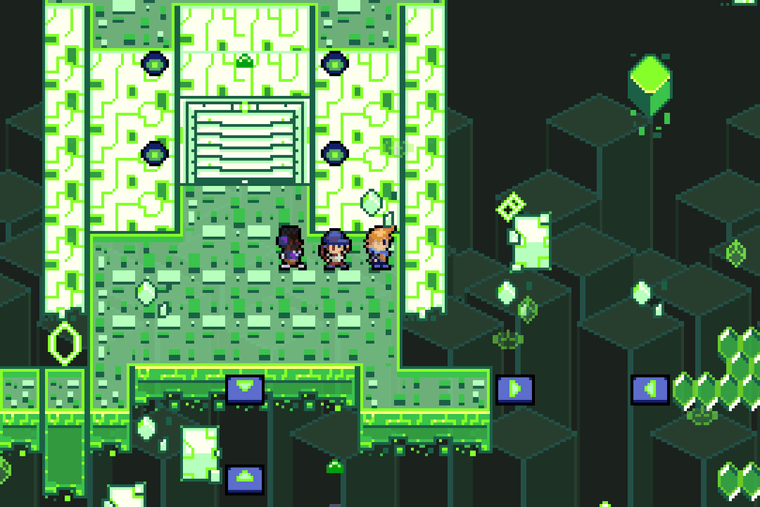
    GreenZone.png

    Those familiar with my work know that I like to create unique and strategic battle systems, and Silver Daze introduces a mix of familiar mechanics from Axial and my jam games, alongside brand new twists on classic RPG formulas.

    In Silver Daze, each character is given a colour, and can equip any card in the game which enables the use of that skill. The kicker is that cards matching the user's colour cost half the MP to use!

    This system can be compared to Final Fantasy VII's Materia system, if individual characters had "specialties" that they were especially proficient in: imagine if Yuffie were better at utilizing Yellow materia, while Cloud prefers Blue! This system enables a lot of depth in customization within the party, while ensuring each character's individual strengths and playstyles still shine through!

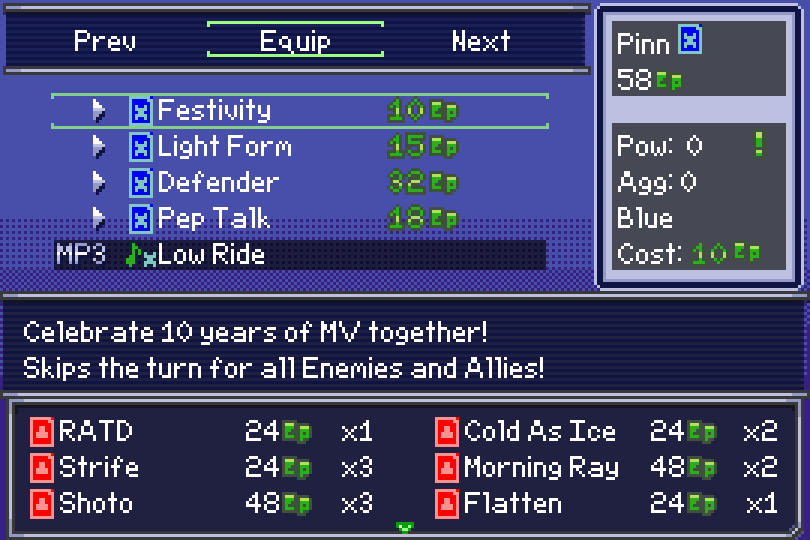
    Festivity.png

    Alongside the card system, each character has an individual Special attack tailoured to their playstyle. This attack restores a bit of your EP, allowing you to regain resources and control your gauge, but there is also a secondary feature: every Special becomes stronger the closer your EP gauge is to the middle!

    In other words, it is not through keeping your EP as high or low as possible, but rather by threading the needle and maintaining it in the middle, that you can truly get the most out of your skills!

    Silver Daze is even Archipelago compatible! You can learn more about that here!

    We worked super hard on this game, and I hope any new players enjoy it!

    Show Your Games

  • Welcome Refugees!
    sawyerfriendS sawyerfriend

    I'm barely even a refugee since I wasn't super active on RMWeb but perhaps that could change for this place! Nevertheless, I am very happy to be here!

    Announcements

  • Happy to see a forum again
    sawyerfriendS sawyerfriend

    Hey everyone, I'm Sawyer!
    Wow, it's been a long time since I hung out on a forum like this. I know that this forum exists in part as a substitute for the defunct RPG Maker Forums, which I used occasionally, but way back in the day I used to spend way too long on sites like this one. I've been kinda hoping the world could return to an era of forums, perhaps it's time to be the change we wanna see in the world. I imagine there aren't many folks here yet, but it's nice to see you guys!

    General Discussion
  • Login

  • Don't have an account? Register

  • Login or register to search.
Powered by NodeBB Contributors
  • First post
    Last post
0
  • Categories
  • Recent
  • Tags
  • Popular
  • Users
  • Groups