Region Offset - Change Encounter Tables On The Fly
-
Hello everyone! I'm trying to do one post a day until I make a habit of it, so part of that will be posting some utilities that I've made in the past. This is a favourite of mine!
Region Offset
Have you ever wanted to make random encounter tables update mid-game? For example, after a critical story moment, areas may get swarmed with more powerful enemies, or a location might temporarily get overrun with an enemy faction. In the past, I've made duplicate maps to accomplish this effect, but I later created a plugin to achieve this. That plugin is now yours!
How To Use It
The plugin contains a Region Offset Variable parameter. Select the variable you want to use to define this, and the game will add this number to the current regions on the map. Here's an example:
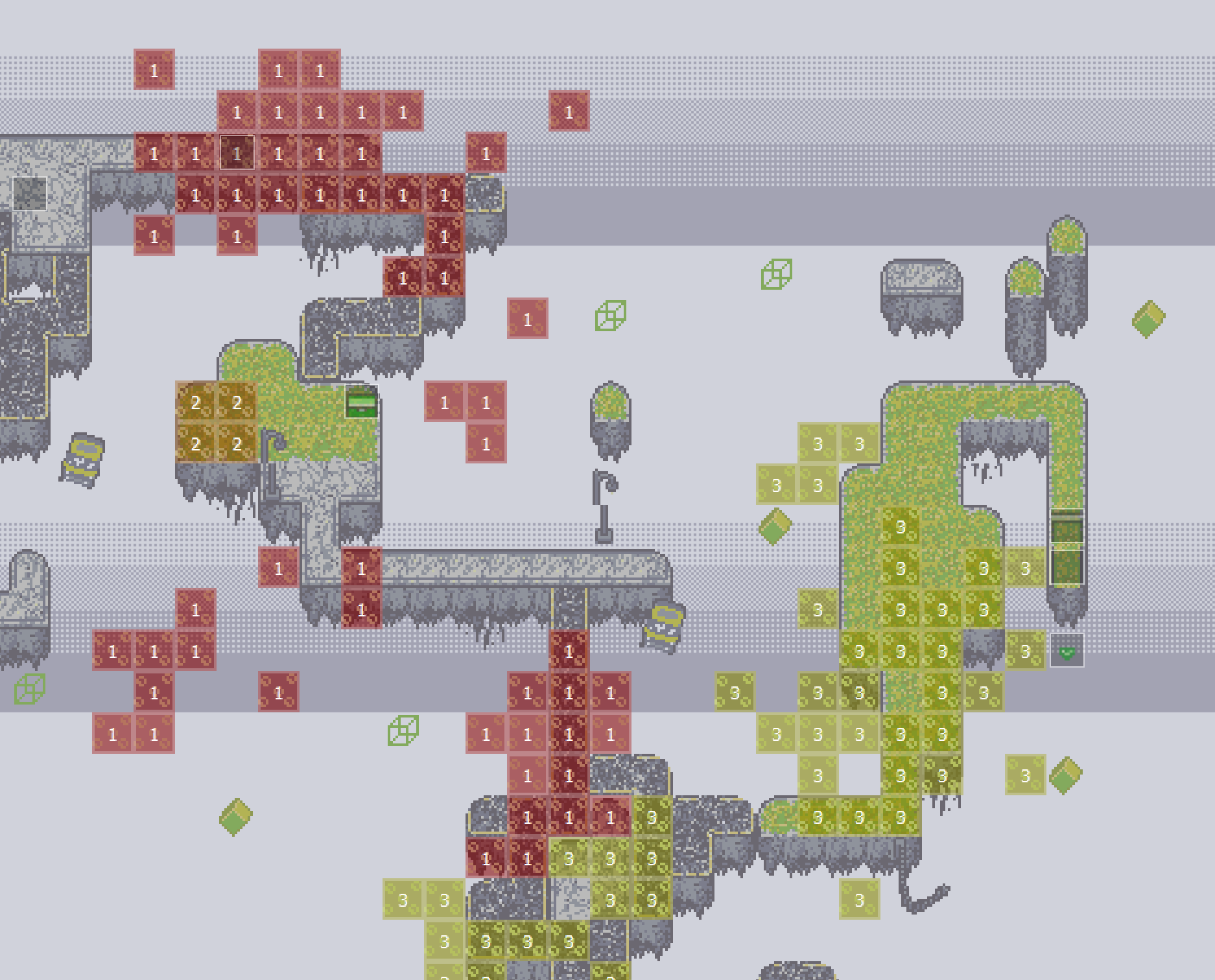
On this map, I have three regions: 1, 2, and 3. But if you look at my encounter table, you'll find that I also refer to regions 51, 52, 53, and 101, 102, and 103.
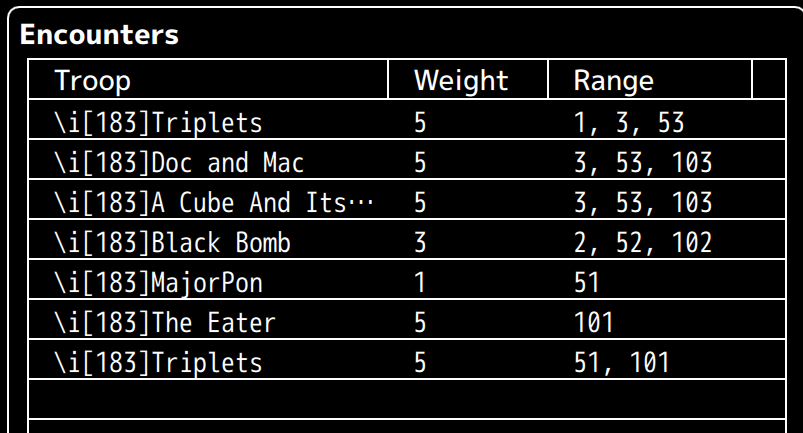
Once the plugin is installed, at any point in the game I can simply change the offset variable to 50, and I'll gain access to the random encounters in that range, or 100 to gain access to those other encounters. If I want to go back to the original encounters, I can simply return the variable to 0.
Important!
This plugin does NOT modify regions, only the encounter tables within those regions. Any other scripts or events that refer to regions will refer to their default region, i.e. the region shown on the map in the editor.
License
This plugin is published under the MIT License!
Copyright © 2026 <copyright holders>

Permission is hereby granted, free of charge, to any person obtaining a copy of this software and associated documentation files (the “Software”), to deal in the Software without restriction, including without limitation the rights to use, copy, modify, merge, publish, distribute, sublicense, and/or sell copies of the Software, and to permit persons to whom the Software is furnished to do so, subject to the following conditions:

The above copyright notice and this permission notice shall be included in all copies or substantial portions of the Software.

THE SOFTWARE IS PROVIDED “AS IS”, WITHOUT WARRANTY OF ANY KIND, EXPRESS OR IMPLIED, INCLUDING BUT NOT LIMITED TO THE WARRANTIES OF MERCHANTABILITY, FITNESS FOR A PARTICULAR PURPOSE AND NONINFRINGEMENT. IN NO EVENT SHALL THE AUTHORS OR COPYRIGHT HOLDERS BE LIABLE FOR ANY CLAIM, DAMAGES OR OTHER LIABILITY, WHETHER IN AN ACTION OF CONTRACT, TORT OR OTHERWISE, ARISING FROM, OUT OF OR IN CONNECTION WITH THE SOFTWARE OR THE USE OR OTHER DEALINGS IN THE SOFTWARE.
If you would like to credit me, a special thanks under Sawyer Friend would be appreciated! If you use a lot of my plugins, a programming credit works too!
PLUGIN
Here's the plugin, simply copy and paste this code!
//=============================================================================
 /*:
 * @plugindesc v1.0.0
 * Use this to offset region enemies using a variable.
 * @author Sawyer Friend
 * @help
 * This lets you add a flat number to region encounters based on a variable, so you can change what enemies appear at given times.
 *
 * Simply define in the plugin params which variable that you want to add onto the regions, then change that variable as desired.
 *
 * (Example: Variable 6 is the variable that changes regions. If you set it to 1, every Region 1 will now pull enemy data from
 * Region 2, etc.)
 *
 * NOTE: This plugin only affects the enemy data. The regions will still be recognized as their normal region number for any other
 * purposes (this is to ensure compatibility with other plugins and features)
 *
 * @param Region Offset Variable
 * @desc This is variable that will offset the regions.
 * 0 will not offset any region.
 * @default 0
 *
 */
//=============================================================================

var Sawyer = Sawyer || {} // IMPORTANT
Sawyer.Parameters = PluginManager.parameters('SawyerRegionOffset');
Sawyer.Parameters = Sawyer.Parameters || {};
Sawyer.RegionOffset = Sawyer.RegionOffset || {};
Sawyer.RegionOffset.variable = Sawyer.Parameters['Region Offset Variable'];


Game_Player.prototype.meetsEncounterConditions = function(encounter) {
	var region = Math.floor(this.regionId() + $gameVariables.value(Sawyer.RegionOffset.variable));
    return (encounter.regionSet.length === 0 ||
            encounter.regionSet.contains(region));
};
Most of my plugins are proprietary and made for use specifically within my games' systems, but I'd be willing to clean some of them up to make them public here as well. I hope this helps you guys!
-
Wow that's such a tight plugin, how useful!!